 FARM
FARMGuide
Instagram Paid Partnership Label: Brand Approval
Understand Instagram's paid partnership label, coordinate approval across two authorized accounts, and verify that the intended brand appears.
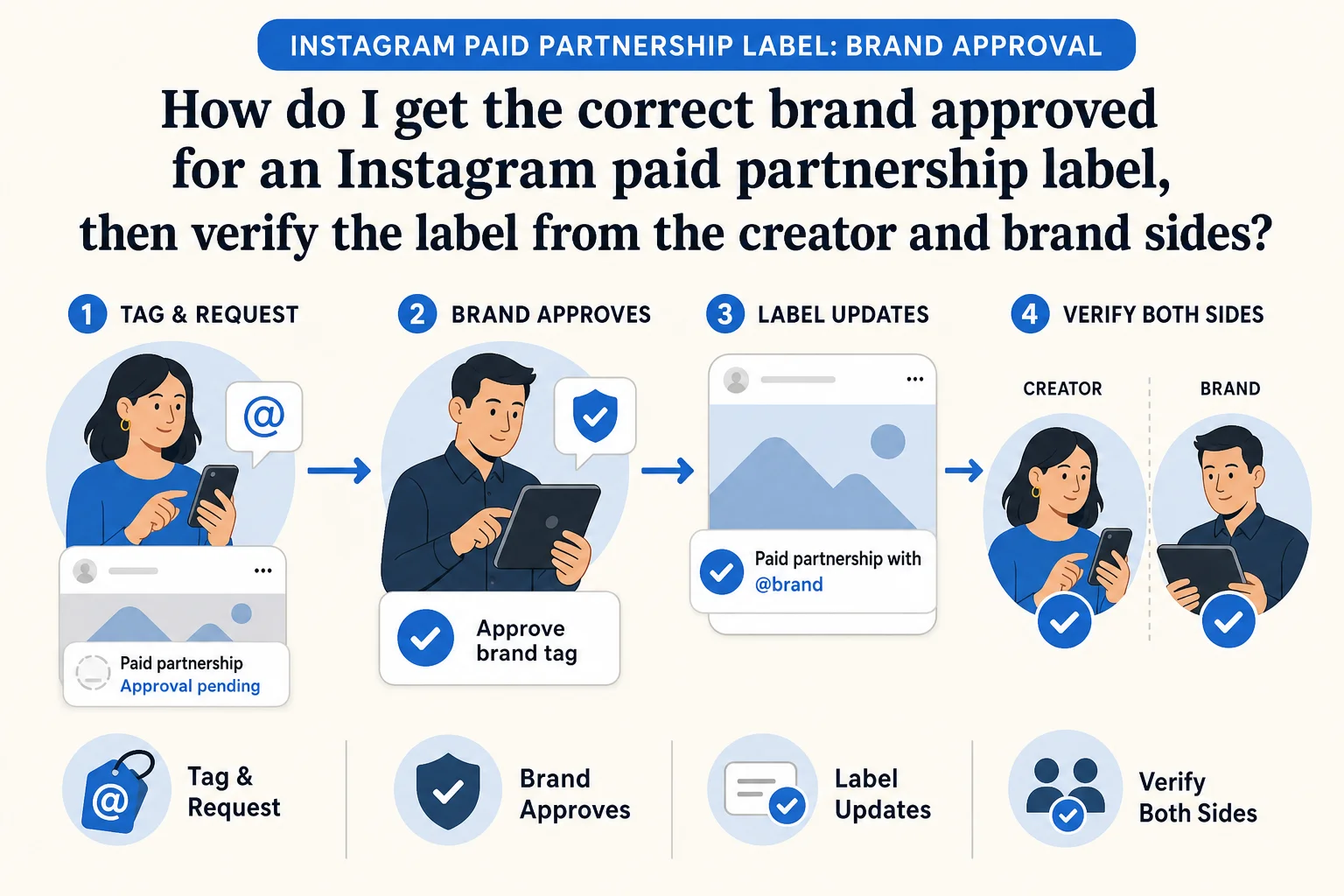
The Instagram paid partnership label identifies organic branded content and, after brand approval, can display the brand you're working with. Instagram says its branded-content policy requires the paid partnership label to tag the brand in organic branded content. A first-time brand tag sends a request; until the brand approves, the label may appear without that brand's name. A hashtag in a caption does not complete this native tagging and approval step. Source: Instagram Help Center
PhoneFarm lets you open and use multiple Instagram accounts. If you're expressly authorized to operate both a creator account and its sponsor brand account, that helps with the practical handoff: inspect the creator's intended tag, open the exact brand identity to handle Instagram's permission step, then return to the creator account to check what viewers can see. Instagram supplies the label, requests and approval controls. The diagrams here illustrate a possible sequence, not real app screens or a promise that the controls appear for every account. If you operate only the creator account, send the request context to the brand owner and let them complete their own step.
What the label does, and what it doesn't
Instagram says a first-time brand tag sends a request and the brand name appears in the label after approval. The same Help Center page says the paid partnership label may appear without the brand name while approval is pending. A label with no brand name is therefore a different state from a confirmed label naming the intended sponsor. Source: Instagram Help Center
This guide covers the organic label and the account handoff around it. A Collab post is coauthored content with a separate invitation and acceptance flow. A partnership ad is a different, optional paid step: Meta says advertisers can boost organic branded content with the label as partnership ads, or create new partnership ads. Source: Meta Neither step is required to call the creator's organic label a Collab or an ad.
Meta's platform policy and any applicable legal disclosure duties are separate questions. Follow the platform's current branded-content rules and have the responsible team check the rules that apply to your campaign. This workflow does not certify legal compliance or settle whether a caption hashtag is sufficient under a country's law.
Check the two accounts before anyone taps a control
Write the creator handle and brand handle exactly as they should appear. Record the content and relationship the team actually approved. Do not assume that the active Instagram account is the intended one. Our multiple-Instagram-account guide covers the broader account register; for this particular request, you need a compact handoff record:
- Creator account and the person authorized to operate it
- Sponsor brand account and the person authorized to operate it
- Intended piece of organic branded content
- Exact brand name expected in the label
- Content and disclosure approval owner
- One person responsible for the final visible-label check
Open and use the authorized creator Instagram account on PhoneFarm. Confirm its visible handle and the approved content. Check whether Instagram offers the branded-content and paid partnership controls to this account. Instagram's Help Center says the feature is in its mobile app and lists eligibility and setup prerequisites; do not promise that every account has an identical current menu. Source: Instagram Help Center
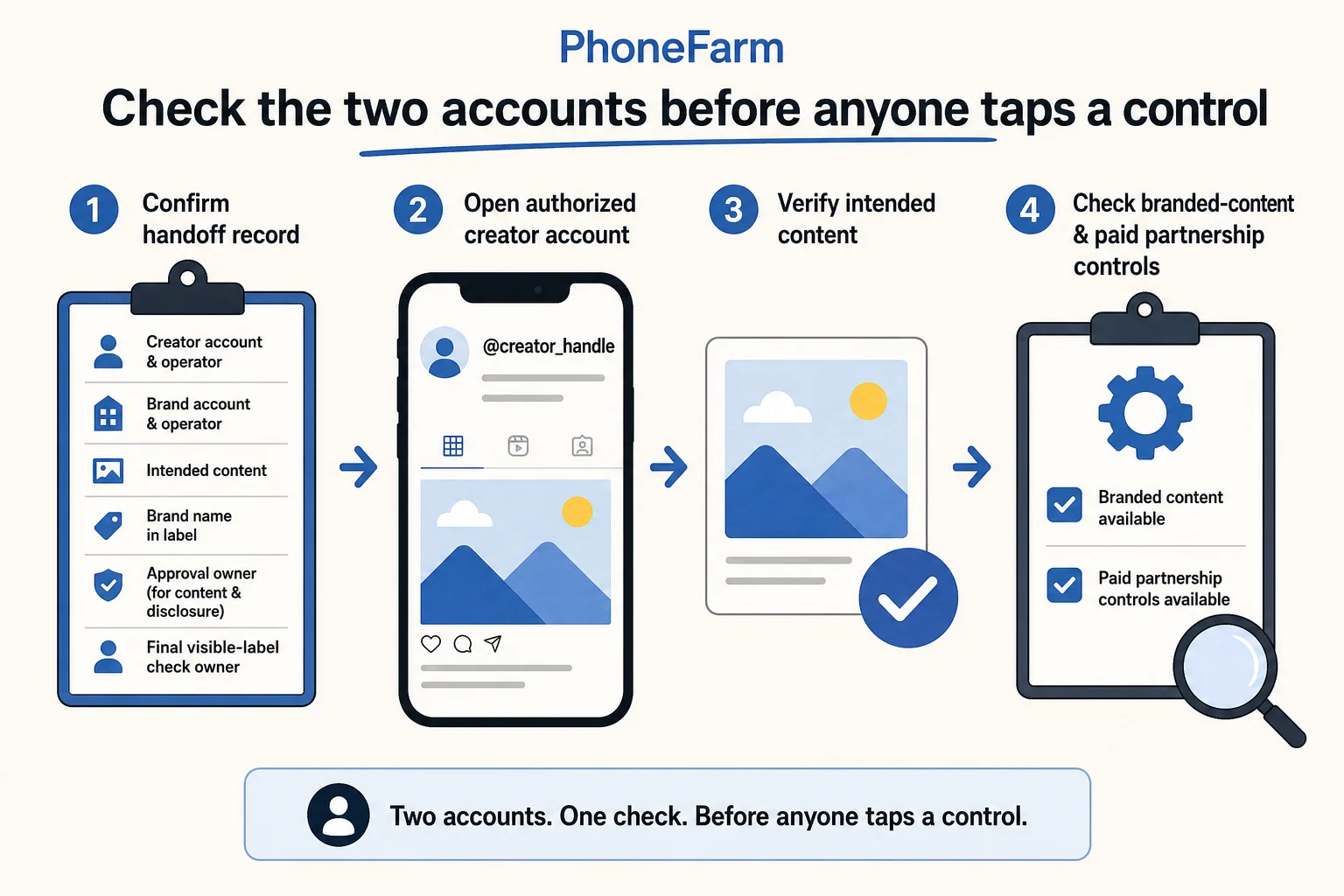
The checkmarks in this illustration are prompts for your own checks, not proof that any account passed them.
Send the request, handle brand permission, verify the name
From the confirmed creator identity, use Instagram's available paid partnership control to select the exact sponsor brand. Compare the result with the handoff record before completing the tag. Instagram says a first-time tag sends a request to the brand. Record request sent only when you can establish the intended brand was selected; otherwise keep it unconfirmed. Source: Instagram Help Center
If you're also authorized for the sponsor brand account, open and use that separate Instagram account on PhoneFarm. Check its visible handle before acting. Instagram's brand-side help describes giving a creator permission to tag a business in the Instagram app. It includes a way for the business to find and approve the creator handle, subject to the controls available to that account. Do not treat a menu path in this article as a guarantee of what your account currently shows. Source: Instagram Help Center
If you aren't authorized for the brand account, stop at the handoff. Send the content and exact creator handle to the brand owner through your team's normal approved channel. Do not ask them for a password or sign in as them. The brand owner decides whether the request and content match the agreement.
Finally, return to the authorized creator account and inspect the actual content. Verify that the Paid partnership with label names the intended brand. Do not turn a pending notification or a label with no brand name into a verified approval. If the wrong brand appears, the control is absent, or the content itself lacks approval, hold the post or correction with a named owner. Instagram says a denied first-time request can remove the label, so record the observed state rather than assuming an earlier tap still applies. Source: Instagram Help Center
Hypothetical approval handoff
Fictional example only. No customer account was operated and no approval or label result is claimed. An agency is authorized to operate @cedartrail_creator and sponsor @cedartrail_gear for a proposed backpack demonstration. The agreed content is a Reel showing how the pack opens, with a caption that the brand team has already reviewed.
The operator checks the creator identity and the proposed Reel on PhoneFarm, then selects the brand in Instagram's paid partnership control if available. They open the separately authorized @cedartrail_gear account, confirm the handle, and inspect the creator permission in Instagram. After the brand-side decision, they return to @cedartrail_creator and check whether the intended brand name is visible in the organic label. That final observation, not the request alone, would close the handoff.
Here is a filled example of a pending record, not a completed real result:
Organic paid partnership label: hypothetical example
Creator: @cedartrail_creator (fictional)
Brand: @cedartrail_gear (fictional)
Content: Backpack demonstration Reel
Operator authorized for both identities: Example assumption only
Creator-side brand-tag request: Not yet observed
Brand-side permission: Not yet observed
Visible label names intended brand: Unknown
Status: Pending
Owner if blocked: Brand partnership manager
Copy this blank version into your own tracker. It is a suggested record, not a PhoneFarm approval, analytics or compliance feature.
Organic paid partnership label handoff
Creator handle:
Brand handle:
Content and approved message:
Who is authorized for each account:
Who approved content and disclosure:
Creator tag/request observed at:
Brand permission decision observed at:
Visible label checked at:
Does it name the intended brand? Yes / No / Unknown
Status: Pending / Verified / Unconfirmed / Blocked
Blocked reason and next owner:
If your team still needs to assign and check the two authorized identities, use the account-readiness guide before this transaction. Browse the PhoneFarm blog for other specific workflows, or review PhoneFarm plans for the account-operation setup. The job here ends when the right organic label is visible and recorded, not when a request was merely sent.